
The call comes from the floor, not the office. Your second-shift lead is on the line, and he is describing more than asking: the prints will not open, every file on the server has grown a new ending, and there is a note on the office PC that nobody wrote. He wants to know if he should turn the server off.
Most owners say yes. It is the same instinct that hits the E-stop when a spindle makes a sound it should not. On a machine tool that is the right call. On a server in the middle of an attack, it destroys the evidence your insurer and your IT people need, and it does nothing about what has already spread. A cyberattack response plan exists for exactly this moment.
Not because the technical work is complicated. That part is our job. It exists because the first hour is full of moves that feel responsible and make everything worse. What follows is the plain-English version we walk through with shops around Parkesburg and across Chester and Lancaster County, in the order you would actually do it, written so the person who picks up that call knows what to do in a cyberattack without having to guess.
Why the First Hour Is Different in a Machine Shop
An office that gets hit loses email for a day. A shop that gets hit loses the server that holds the prints, the CAM programs, the travelers, and the JobBOSS or E2 database that tells you what is due Friday. The floor does not stop because the machines broke. It stops because nobody can tell them what to cut.
That changes the math on every decision in the first hour of a ransomware response. Speed matters more than it would for an accountant, and so does not making it worse, because the one thing you cannot buy back is a clean copy of last night's data. If you have never seen how a machine shop ransomware attack actually unfolds, it is worth ten minutes, because almost nothing about it looks the way owners picture it. The version you will see is a phone call and a screen, and the part that decides how bad it gets is what you say next.
There is a second clock running that most small manufacturers do not know about. If money left the building, the FBI's Recovery Asset Team can often claw back a wire transfer, but only if it is reported fast. Reported inside 72 hours, that team recovers the funds in roughly 70 percent of cases. Wait a week and you are on your own.
Before You Touch Anything: Four Ways Owners Make It Worse
Every one of these feels like taking charge. Every one of them costs you, and every one of them shows up in the ransomware response stories we hear from other shops.
Do not power the affected computer off if you can avoid it. Disconnecting it from the network is the move. CISA's own checklist says to isolate the device and to shut it down only when there is no other way to cut it off, because powering down wipes the evidence in memory that shows how the attacker got in.
Do not delete anything. The ransom note, the odd email your office manager forwarded that morning, the alert your antivirus popped and somebody dismissed: leave all of it exactly where it sits. It is what your IT team and the insurer's investigators will work from.
Do not pay a ransom on the spot. More on that below, but the short version is that the panicked first hour is the worst possible time to make a five-figure decision.
Do not use the hacked email account to talk about the attack. If the attacker is in your inbox, they are reading your replies and watching you organize the response. Switch to phone calls, or to a personal account on a phone you know is clean.
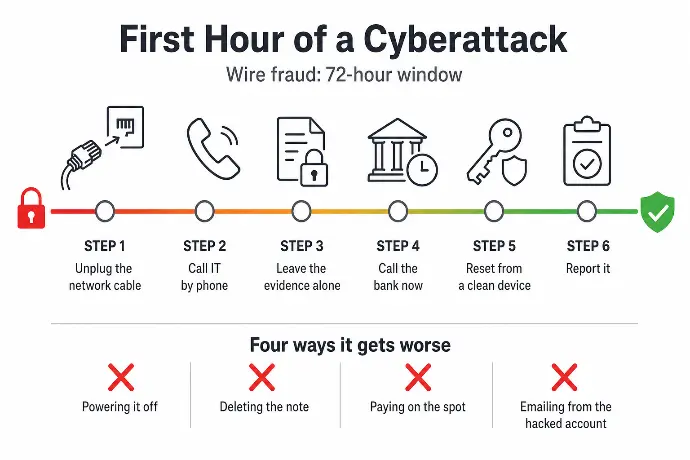
The Cyberattack Response Plan, Step by Step
Work through these in order, starting the moment something looks wrong. None of them requires technical skill. They require somebody to stay calm and follow the list.
1. Get the affected machines off the network
Pull the network cable out of the back of anything that looks affected and turn off its Wi-Fi. If it is more than one or two machines, unplug the switch they share. This stops the spread to the other PCs on the floor and, more importantly, to your backups. Leave the machines running.
2. Call your IT provider by phone
Not email, not a ticket, not a Teams message. The phone. If you have cyber insurance, the carrier is the second call, because many policies require their incident team to be involved early, and some will not pay for work done by anyone else. Keep both numbers somewhere you can reach without a working computer. The back of the office door is a fine place.
3. Leave the evidence alone
No wiping, no reinstalling, no tidying up. Taking a photo of the ransom note with your phone is useful; keep the originals too. Your instinct to get the machine back into service is right, and it is also the reason the same attacker gets back in three weeks later. Let the people who do this for a living decide what is clean.
4. If money moved, call the bank now
A fake invoice, a changed remit-to address, a wire to a "new" supplier account: if any of it went through, call your bank before you finish reading this. Ask them to recall the transfer and freeze it if they can. Then file with the FBI's Internet Crime Complaint Center, because the IC3's 72-hour window is what puts the Recovery Asset Team on it.
5. Reset passwords from a clean device, and turn on MFA
Start with email and anything with admin rights, using a laptop or phone you are confident was not touched. Turn on multi-factor authentication for every account that supports it while you are in there. Do this after the first four steps, not instead of them.
6. Report it
Reporting helps recovery, helps the next shop, and is sometimes required. The next section covers who gets the call.
Where to Report a Cyberattack
For a Pennsylvania machine shop, two reports cover almost everything when it is time to report a cyberattack: the FBI's Internet Crime Complaint Center at ic3.gov, and CISA, the federal cybersecurity agency. Both are online forms. The IC3 report is the one that matters most when money is involved, and it needs to go in fast.
Then there is the question of personal data. If the attacker got at files holding employee Social Security numbers, bank details, or customer contacts, you may be legally required to notify the people affected, sometimes on a short deadline. Pennsylvania has its own breach-notification law, and customers in other states bring their states' rules with them. This is a call for your lawyer or IT provider in the first day, not the first month, because the clock on those deadlines is already running.
Your cyber insurer gets a report too, and it belongs near the top of the list. If you are not sure what that report should include, or which incident team the policy points you to, read up on what your cyber insurance really covers before you need it.
Should You Pay the Ransom?
If it is ransomware, this is the question you will be asked within the hour. The FBI does not recommend paying. The money does not guarantee your files come back, it tells the next gang your shop pays, and it funds the next attack.
It is your decision. It is also not a decision to make alone at 9 p.m. with second shift standing around. Make it with law enforcement, your IT or incident-response team, and your insurer, and make it after somebody has checked whether a free decryption tool already exists for the strain that hit you. The No More Ransom project publishes those, and for some strains they work. That is one more reason to get help involved before you pay anyone.
What Your Carrier Expects You to Already Have
Here is the part of the ransomware response that gets decided before the attack, and the part that separates a machine shop that is cutting again on Thursday from one that is still explaining itself to customers in October. Every step above is easier if three things are written down somewhere that does not depend on your network:
- Who to call first. Your IT provider and your insurance carrier, with the phone numbers, on paper, in the office and on your phone.
- Where the backups are, and proof they restore. Not a green checkmark on a dashboard. A date when somebody pulled a real print or a real JobBOSS backup out of them and opened it. If you do not have that, start with a backup and recovery plan you have actually tested, because it is the difference between a bad Tuesday and a bad quarter.
- Which systems come back first. The file server with the prints, the ERP, the CAM workstations, email. Decide the order now, while nobody is shouting.
A single page covers all of it for most small manufacturers. It also happens to be the incident response plan your insurance application asks whether you have. We build that page with every shop we take on, and our cyber-insurance package hands it to your broker in the form the underwriter wants to see, so the renewal is a formality instead of a scramble.
Cyberattack Response Plan FAQs for Small Manufacturers
What is the first thing to do in a cyberattack?
Get the affected computers off the network without powering them down: pull the network cable and turn off Wi-Fi, then call whoever handles your IT by phone, not email. Isolating the machine stops the spread to other PCs and your backups, while leaving it running preserves evidence. Everything else in the plan waits until those two things are done.
Should I turn off the computer if I get ransomware?
Not if you can disconnect it instead. CISA's guidance is to isolate the device from the network and power it down only when there is no other way to cut it off. Shutting down wipes the evidence held in memory that shows how the attacker got in and what they touched, which is exactly what your IT team and your insurer's forensics people will ask for.
We wired money to a scammer. What do we do?
Call your bank immediately and ask them to recall and freeze the transfer, then file a report with the FBI's IC3 within 72 hours. The FBI's Recovery Asset Team recovers the money in about 70 percent of cases reported inside that window, and the odds fall off fast after it. Do this before you do anything else on the list, including calling IT.
Should a small manufacturer pay the ransom?
The FBI does not recommend it, and neither do we. Paying does not guarantee your files come back, it marks your shop as one that pays, and it funds the next attack. Make that call with law enforcement, your IT or incident-response team, and your insurer, and check first whether a free decryption tool already exists for the strain that hit you. Sometimes it does.
Who do I report a cyberattack to in Pennsylvania?
File with the FBI's Internet Crime Complaint Center at ic3.gov and report the incident to CISA. Tell your cyber insurer as well, because most policies require it. If customer or employee personal data was exposed, Pennsylvania's breach-notification law and other state laws may require you to notify the people affected on a deadline, so get your lawyer or IT provider involved early.
How long does it take a machine shop to recover from a cyberattack?
With tested backups and a written plan, the shops we work with are typically quoting and cutting again inside 1 to 3 days, with some cleanup after. Without them, 2 to 4 weeks of disruption is common, and a share of small manufacturers never fully recover the lost work. The difference is almost never the attack. It is what was in place the day before.
Would Your Shop Know What to Do in a Cyberattack Tonight?
Starlux IT has been the IT partner for small manufacturers around Parkesburg, Coatesville, Downingtown, and Gap since 2004. Our techs are local and on-site the same day, which matters more on the night the server locks up than on any other night of the year. Our managed IT with 24/7 monitoring covers second and third shift, so the alert that fires at 9 p.m. gets a human, not a voicemail. And our cyber-insurance package puts the incident response plan, the tested backups, and the MFA in the form your broker needs to hand the underwriter.
Free 30 minutes, no pressure. We'll check what you have, show you the gaps, and you'll know exactly where you stand, whether you hire us or not. If you would rather not find out what to do in a cyberattack by living through one, this is the easier way.