
Somewhere right now, a spreadsheet has your shop's name in it. Not your quote log. Not a customer's approved-vendor list. This one belongs to someone who has never set foot in Chester County, and your row is already half filled in: company name, the office manager who runs payroll, a guess at monthly revenue, and a checkbox for "clean record, no known incidents."
That checkbox should bother you. To the person building the list, a shop that has never been hit is not a shop with good security. It is a shop whose passwords still work.
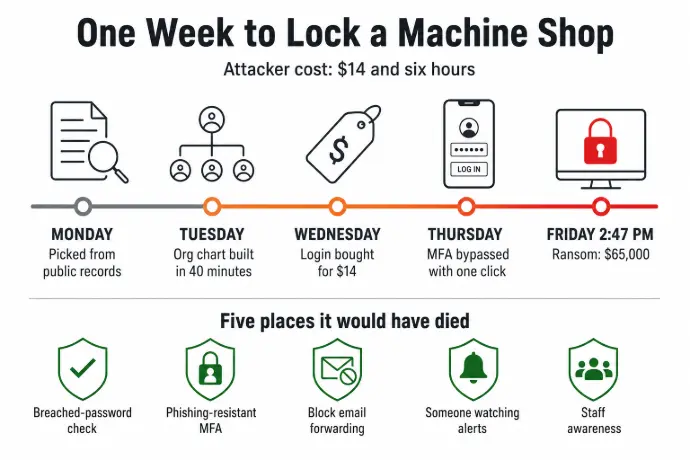
Most owners picture a machine shop ransomware attack starting with a genius breaking through a firewall. It doesn't. It starts with public records, a $14 purchase, and one email to the wrong person. Here is the week that attack takes, told from the attacker's side. The shop is a composite (a 22-person job shop with a big OEM customer), but every method comes from current threat reporting. Then, the five places it would have died.
Why Manufacturing Ransomware Pays So Well
Dragos counted 1,140 ransomware incidents against industrial companies in the second quarter of 2026 alone, and manufacturing took 747 of them, about 65 percent. The United States had 431, more than any other country by a wide margin. Ransomware crews work at volume, and the 10-to-50-person shop is their preferred size. The reason is economics.
A big manufacturer has a security team and lawyers; a one-man shop has too little at stake. A 22-person job shop sits in the sweet spot: payroll, a customer list, a file server full of prints and programs, a purchase order with a ship date on it, and an owner who will pay to get the floor moving again. That is what makes machine shop ransomware such a dependable line of work.
Here's the plain-English version of how ransomware attacks work at that size, the same walkthrough we give shops around Parkesburg and across Chester and Lancaster County.
Monday: How I Picked You
I work regular hours. My spreadsheet holds about 40 prospects a month, mostly shops between 10 and 50 people.
I did not find you through a breach or a tip. I found you on a state business registry, a supplier directory that lists your equipment, and a public bid record with a named contact. One afternoon gave me your legal name, a recent job's value, and who submitted it.
The strongest signal I get is that nothing has gone wrong at your shop yet. It tells me your passwords still work and nobody has had a reason to change a login in years. A clean record is the first thing I look for.
Tuesday: Building Your Org Chart for Free
I spend about 40 minutes on you today, using nothing but a browser.
LinkedIn hands me eight current employees with titles. Your office manager has been there six years and lists "accounts payable, payroll, and supplier invoicing" in her summary. You're listed as president, with a thin profile, so you won't notice someone new engaging with your company page.
Your job ads on Indeed say "experience with JobBOSS or E2 a plus," so I know what runs your front office. I now know who handles your money, what software she uses, and who can approve a payment without a second signature. She is my target, not you. You're harder to reach and more cautious. She is busy enough that one more email does not get a second look.
I have not spent a dollar yet.
Wednesday: I Bought Your Login for $14
Stolen credentials are cheaper than a box of inserts. Infostealer malware sits on somebody's home computer, often for years, recording every password typed into it. The results get bundled into "stealer logs" and sold on Telegram channels and forums, searchable by company email domain.
I search for yours. Two results.
One is your office manager's work email with a password saved in her browser. The other is a personal Gmail address that looks like a family member's, probably from a laptop on your home network. I pay $14 for the package. It takes four minutes.
Her password is a pet's name, a year, and an exclamation point. I run it through HaveIBeenPwned (a free database anyone can check): it leaked in a retail loyalty-program breach three years ago and has not been changed since.
The family member's password, with minor variations, shows up on a streaming service, a gaming account, and your shop's Microsoft 365 login. It works. The only thing between me and the inbox is the second factor.
Spend so far: $14.
Thursday: Getting Past Your MFA
Multi-factor authentication stops a lot of attacks. How it's set up matters more than whether the box is checked.
The old trick, spamming approval prompts until someone taps "Approve" to make it stop, fails here. Microsoft has required number matching in Authenticator since May 2023, so she has to type a two-digit code from her login screen rather than tap a button. Push-bombing fails against that.
What still works is adversary-in-the-middle phishing. I send her an email dressed up as a Microsoft 365 password-reset notice, citing the exact breach her password leaked in, so it reads as real. The link goes to a page that mirrors the Microsoft sign-in screen. That page is a proxy I control.
She enters her password and approves the MFA prompt. My proxy forwards both to the real Microsoft server, which validates them and issues a session token. That session token lands in my browser instead of hers. She sees a "password updated" message. I am now signed in as her, and Microsoft treats my activity as legitimate because, as far as it can tell, it is.
I had a backup plan in case she didn't click: a call to your front desk, posing as your IT company, using a name from a Google review you left 18 months ago, asking to have the office manager approve a verification push. She was out on the floor. Dragos lists this exact pretext, someone posing as the company's IT support, as the most consistently reported way ransomware crews got in during the second quarter of 2026.
By Thursday night I'm inside her Microsoft 365 account. I set up an email forwarding rule that silently copies her messages to an address I control, and I wait.
Friday, 2:47 PM: Why I Waited 36 Hours Before Encrypting
I read email for 36 hours before I lock anything. That's how I size the ransom.
In those 36 hours I find your cyber insurance policy, in an email from your broker, with a cyber liability sub-limit of $250,000. A bank reconciliation shows the operating account at about $180,000 at month end. Your customer list is in a quote template she emailed to herself. And a thread with a buyer at your biggest OEM customer mentions a job starting in three weeks with a ship date you cannot miss.
I set the ransom at $65,000 in cryptocurrency. Low enough that you'll pay instead of fighting, high enough to be worth my week. Demands above roughly 10 percent of the cash I can see tend to get contested. This one sits under that line.
I release the encryption at 2:47 on Friday afternoon. Your bookkeeper leaves at 3:00 on Fridays; an out-of-office reply in the forwarded mail told me. You're at a customer's plant in Lancaster County; your synced calendar told me that. The person most likely to notice is walking to her car. The person who can make a decision is unreachable.
Second shift clocks in at 3:00. The machines finish the program that was loaded, but nobody can open a print, pull a Mastercam file, or look up a traveler. The JobBOSS database is locked. So is the folder of CMM reports for that OEM. By Friday evening there's a ransom note on every screen in the office.
Total cost to me: $14 and about six hours of work, spread over a week.
Five Places This Machine Shop Ransomware Attack Would Have Died
None of these are expensive. Most are already in the Microsoft 365 plan the shop pays for. They just weren't turned on, and nobody was watching.
1. The $14 credential purchase (Wednesday)
Stolen credentials only work if the password still does. Microsoft 365 can check every password against known-breached lists and refuse the bad ones, and a password manager makes a different password for every account painless. Either one turns my $14 purchase into a receipt for nothing. HaveIBeenPwned will tell you today, for free, whether your shop's addresses are already in a dump.
2. The MFA bypass (Thursday night)
Number matching blocks the lazy version of this attack. Adversary-in-the-middle phishing beats it because the attacker forwards the real prompt to the real user. Three things stop that: phishing-resistant MFA (a hardware key, a passkey, or Windows Hello for Business, none of which a fake page can relay), a Conditional Access rule that only lets shop-owned computers sign in, and the anti-phishing filters in Microsoft Defender for Office 365. Any one would have stopped the session token capture or made it useless from my computer.
3. The email forwarding rule (Thursday night)
Microsoft 365 lets an admin block external email forwarding rules for the whole company in one setting. With that in place, my 36 hours of reading never happens. I might have encrypted anyway, but I'd have been guessing on the ransom, and guessing is how attackers get told no.
4. The 36 hours of silence (Thursday night through Friday)
Microsoft Defender for Business, included in Microsoft 365 Business Premium, raises an alert the moment a new email forwarding rule appears on a mailbox. Had anyone been watching that queue Thursday night, I'd have been thrown out before I read a single message.
This is the biggest change a shop your size can make, and it is rarely a new product. It's someone actually reviewing the alerts your tools already generate, including at 9:00 on a Thursday night when second shift is running and your IT guy is asleep. It's the difference between antivirus and EDR: one logs an event, the other gets a human on the phone. And the gap between paying $65,000 and restoring the file server by Monday is a tested backup and recovery plan.
5. The public records (Monday and Tuesday)
You cannot unpublish a state registry or a bid award. What you can control is how much your people volunteer online about their access. "Accounts payable, payroll, and supplier invoicing" in a public profile is a target painted on one person. That's worth a 15-minute conversation with the office staff, framed as looking out for them.
Your Insurance Carrier Is Asking the Same Five Questions
Pull out your last cyber insurance renewal application and read the questions. MFA on email and remote access. Endpoint detection with someone monitoring it. Tested backups kept off the network. Phishing training. Carriers wrote that list from claims files, and the attack above is what those files look like. A shop that can answer "yes" with evidence has closed all five doors. We covered what carriers want in our post on cyber insurance for manufacturers; it's why our compliance package is built to hand straight to your broker. Your bigger OEM customers' vendor security questionnaires ask the same things.
Three Questions to Ask Whoever Runs Your IT
You do not need to understand a session token to check whether your shop is exposed. Send these three to whoever runs your IT:
- Are we using phishing-resistant MFA (hardware keys, passkeys, or Windows Hello for Business) for the owner, the office manager, and anyone who can move money?
- Is external email forwarding blocked for the whole company at the Microsoft 365 level?
- Where do our security alerts go, and who reviews them, including on second shift?
A clear "yes, here's the screenshot" on all three means you're in decent shape. A pause, or "I'd have to check," is also an answer.
Machine Shop Ransomware FAQs for Small Manufacturers
Do ransomware gangs really target small machine shops?
Yes, and they prefer them. Dragos recorded 747 manufacturing ransomware incidents in the second quarter of 2026 alone, 65 percent of all industrial victims, with equipment makers among the hardest-hit subsectors. Crews run at volume and favor the 10-to-50-employee shop: payroll, a customer list, and a hard ship date, but no security team to make the job expensive.
How much does it cost an attacker to hit a 20-person shop?
In the walkthrough above, $14 for stolen credentials and about six hours of work spread over a week. Stealer-log packages typically sell for $10 to $20, and the whole attack runs well under $100 out of pocket. Compare that to a $65,000 demand sized off your own bank reconciliation and the return on their week is obvious.
How long do attackers sit in your email before locking files?
In this example, 36 hours. Dragos documented one 2026 intrusion where the crew spent several days quietly stealing credentials and destroying backups before encrypting anything. That dwell time is when they read your insurance policy and bank balance to set the ransom, and it is also the window when a monitored alert catches them.
What is phishing-resistant MFA, and does a small shop need it?
Phishing-resistant MFA means a hardware security key, a passkey, or Windows Hello for Business: methods tied to your device that cannot be relayed through a fake login page. A push notification or text code can be. A small shop does not need it for everyone on day one. Start with the owner, the office manager, and anyone who can approve a payment.
Would Your Shop Have Caught This on Thursday Night?
Starlux IT has been the IT partner for small manufacturers around Parkesburg, Coatesville, Downingtown, and Gap since 2004. Our managed IT plans for manufacturers include round-the-clock monitoring, second and third shift included, so a forwarding rule created at 9:00 PM gets a human response, not a log entry nobody reads. Our techs are local and on site the same day. Our cyber-insurance compliance package covers the five controls above, ready for your broker.
Not sure whether those five doors are open at your shop? Give us 30 minutes, no pressure. We'll check what you have, show you the gaps, and you'll know exactly where you stand, whether you hire us or not.