
The file server in the closet behind the front office ran nine years without a complaint. This morning it won't boot.
Nobody can pull prints. The CAM programs live on that box, so machines sit idle at the control while operators wait. JobBOSS won't open, which means nobody can even look up what was due out this week. Every machine in the building runs fine. Not one of them can make a part.
Whether that morning costs you a day or costs you the business comes down to your backup and disaster recovery plan, and the plan only exists if somebody built it before the server quit.
That's what data loss actually looks like in a shop: not an abstract IT problem, but a floor full of people standing around while ship dates slip and a customer starts asking questions. The numbers behind it are ugly. FEMA figures cited by the Insurance Information Institute say 40% of businesses never reopen after a disaster, and another 25% close within a year. Most of them weren't killed by the fire or the crash itself. They were killed by not being able to get back up.
The good news: backup and disaster recovery that works doesn't require an IT department or an enterprise budget. What follows is the plain-English backup and recovery plan we use with shops around Parkesburg and across Chester and Lancaster County. It's built for small manufacturers with 5 to 25 computers and zero patience for downtime.
Why Backup and Disaster Recovery Is a Production Problem
In a manufacturing business, data isn't paperwork. It's throughput.
- Your job system (JobBOSS, E2, Global Shop, Epicor, or QuickBooks plus a mountain of spreadsheets) holds every quote, traveler, due date, and price.
- Your CAD/CAM files (SolidWorks, Mastercam, Fusion 360) are the parts. If the file server dies, the floor can't pull prints and can't post programs.
- Everything else (customer POs, quality records, financials, email) is what you need to invoice, pass an audit, and win the next job.
Lose any of it to a failed drive, a ransomware hit, a deleted folder, or a lightning strike, and you're not "down a computer." You're not quoting, not cutting, and not shipping.
Two outside parties now care about your backups even if you don't. Your cyber insurance carrier asks point-blank about tested, off-site backups at every renewal. And more OEM customers are sending vendor security questionnaires with "how do you back up and recover your data?" on the first page. More on both below.
So here's the plan.
A Backup and Disaster Recovery Plan Sized for a Small Shop
1. Follow the 3-2-1 backup rule
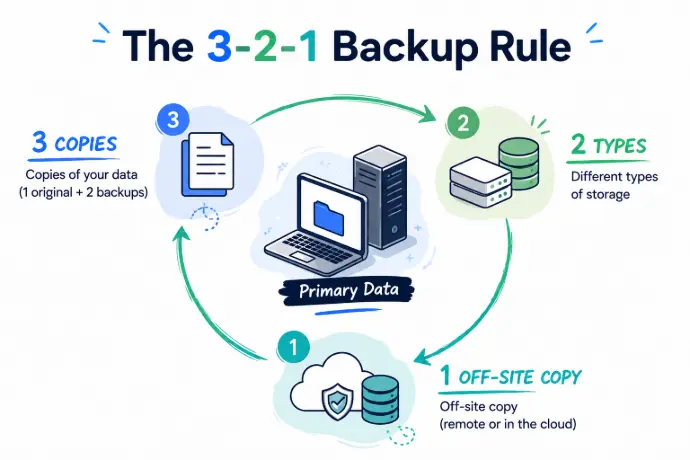
Three copies of your data, on two different kinds of storage, with one copy off-site. In practice for a small shop: your live data is copy one. Copy two goes to a backup device in the building (a NAS or backup appliance) so restores are fast. Copy three goes to the cloud, so a fire, flood, theft, or ransomware hit can't take everything at once. The 3-2-1 backup rule has survived decades of technology changes because it covers the failure you didn't see coming, not just the one you did.
2. Use image-based backup on the server
For the machine running your ERP and file shares, copying files isn't enough. Use image-based backup: a snapshot of the entire server, settings and databases included. When the hardware dies, you restore the whole thing to new hardware (or a temporary virtual machine) in hours, instead of spending a week reinstalling software and hunting for license keys.
That's the difference between a bad morning and a bad month.
3. Automate it, and cover second and third shift
Manual backups fail because people are busy running a shop. Automate the schedule and let the software alert someone when a job fails, because "the backups stopped working in March" is a sentence you want to hear in March, not after the crash.
One thing generic advice always misses: if your shop runs a second or third shift, a backup that finishes at 6 pm misses everything those shifts produce. Data changes around the clock in a manufacturing business, so protect it accordingly: frequent snapshots for the ERP database and active job files, nightly at minimum for everything else. It's also why our own monitoring runs 24/7 instead of banker's hours.
4. Keep old versions, not just last night's copy
A synced folder is not a backup. If ransomware encrypts your files, OneDrive or Dropbox will faithfully sync the damage right over your good copies.
Real backup keeps multiple restore points, so you can roll back to before the infection, before the corrupted update, before somebody saved over the only copy of a fixture drawing. CISA's #StopRansomware Guide makes the same point in federal language: keep offline, encrypted backups and test them regularly, because most ransomware hunts down and deletes every backup it can reach. Put plainly, ransomware recovery is only possible if a clean copy exists somewhere the infection couldn't touch. Keep several weeks of versions, and take a snapshot before anything big, like an ERP upgrade.
5. Watch your storage
"Backup Failed: Storage Full" is not a message you want to discover after the crash. CAD files and job photos grow fast. Check usage monthly, turn alerts on, clear out duplicates, and keep 20% to 30% headroom so backups never quietly stop running.
6. Test the restore, not the backup
The only backup that counts is one you've actually restored. Plenty of shops find out mid-crisis that their backups were incomplete or corrupt, which is the worst possible moment to learn it.
Once a quarter, run a fire drill: restore a folder of prints, restore the job-system database to a test location, and time both. Then answer two questions in plain English. How long can the floor sit idle? That's your recovery time target. How much re-entered work can you live with (an hour of orders, or a whole day)? That's your recovery point target. This drill is the working end of business continuity planning: if the numbers don't hit your targets, fix the plan now, not mid-disaster.
7. Train your people
Most ransomware walks in through email: one clicked "invoice" from a fake vendor, and the whole network is encrypted by morning. Ten minutes at a toolbox talk goes a long way. Show what a phishing email looks like, say where files must be saved (the server, not desktops), and name who to call the second something looks off. Then pair trained people with endpoint protection that can actually stop an infection; we broke down antivirus vs EDR in plain English if you're weighing the two.
Your people are either the easiest way in or your first line of defense. Training decides which.
The First Four Moves When It Happens Anyway
Even good plans get tested. When it happens:
- Size it up. One workstation, or the whole server? If you suspect an infection, ransomware recovery starts at the wall jack: disconnect the affected machines from the network before it spreads.
- Restore in production order. Job system and current job files first. The floor needs prints and travelers before anyone needs the 2019 archive.
- Tell the team. Who's doing what, what runs on paper in the meantime, and what to tell a customer if a date is at risk. Silence creates more chaos than the outage.
- Write down what happened. The cause, how long recovery took, what was missing. Then fix the plan while it's fresh.
The Paperwork Payoff: Renewals and Audits Get Easier
Do everything above and something quiet happens: the scary forms stop being scary. Every renewal cycle, cyber insurance backup requirements get stricter. Carriers now want tested, off-site, access-controlled backups in writing, and the wrong answers mean higher premiums or no renewal at all; we covered the whole form in our guide to cyber insurance for manufacturers. OEM vendor security questionnaires ask nearly identical questions.
At Starlux IT, we build the backup piece so the documentation can go straight to your broker or your customer as part of our managed IT services for small manufacturers: boxes checked, no scrambling, and a backup and recovery plan you can show instead of describe.
Backup and Disaster Recovery FAQs for Small Manufacturers
What is the 3-2-1 backup rule?
The 3-2-1 backup rule means keeping three copies of your data, on two different types of storage, with one copy off-site. For small manufacturers, that usually looks like the live data on your server, a second copy on a backup appliance in the building for fast restores, and a third copy in the cloud that a fire or ransomware hit can't touch.
How often should a small manufacturer back up its data?
Back up your job-system database and active CAD/CAM files at least hourly, and everything else at least nightly. If your shop runs a second or third shift, schedule snapshots around the clock: a backup that finishes at 6 pm misses everything those shifts produce. Frequency should match how much re-entered work you can live with losing.
Does cyber insurance require data backups?
Yes, in practice it does. Most carriers now ask directly whether you keep tested, off-site backups, who can access them, and how fast you can restore. Weak answers mean higher premiums, exclusions, or a declined renewal. Documented restore tests are the strongest evidence you can hand your broker, and they cost nothing but an hour a quarter.
Is OneDrive or Dropbox a backup?
No. Sync services copy every change, good or bad, to all your devices. If ransomware encrypts your files or someone saves over the only copy of a fixture drawing, the damage syncs right along with it. A real backup keeps multiple older versions in a separate location, so you can roll back to before the trouble started.
What's the difference between backup and disaster recovery?
A backup is the copy; disaster recovery is the plan for using it. Backup answers whether your data survives. Disaster recovery answers how fast the shop is running again: who does what, which systems come back first, and how long the floor sits idle. Good backup and disaster recovery together turn a dead server into a bad morning instead of a lost week.
How long does it take to recover from a server crash?
With image-based backup, a small shop is typically running again in 2 to 4 hours, restored to spare hardware or a temporary virtual machine. Rebuilding a server by hand, reinstalling software, and hunting down license keys usually takes 3 to 10 days. That gap is the single strongest argument for imaging the whole server instead of copying files.
Would Your Backups Actually Save You?
Most owners we meet think they're covered, right up until we test a restore together. We're Starlux IT in Parkesburg, and managed IT for small manufacturers is what we do every day, for shops in Coatesville, Downingtown, Gap, and across Chester and Lancaster County. We know what a server full of SolidWorks and Mastercam files needs, we build backups that satisfy the insurance form, and our techs are local enough to be on-site the same day.
If you're not 100% certain your shop could be running the day after a crash, find out before it matters. Free 30 minutes, no pressure: we'll check what you have, show you the gaps, and you'll know exactly where you stand, whether you hire us or not.