
The sticky note is stuck to the underside of the middle desk drawer, the one visitors never open. Through the window behind the desk, the shop keeps running: a mill cutting steel, second shift clocking in. The desk itself has gone quiet. The office manager who ran payroll and half the vendor logins nobody else wrote down gave her notice three weeks ago, and that drawer is the only place anyone thought to look.
She didn't create that mess on her way out. An IT offboarding checklist almost always breaks at a decision made on someone's first week, not their last one, back when setting her up in the vendor portal with her own personal email felt faster than doing it right. Nobody ever circled back to fix it.
For a small commercial manufacturer, that's the whole story in miniature. One national survey found that 83 percent of people still had access to a former employer's accounts after leaving, and 56 percent admitted using that access to cause harm on their way out (Beyond Identity, 2022). For a 20-person shop, that's not an abstract number. It's the estimator who still has read access to your quoting software six months after taking a job with the competitor down the road, or the CAM programmer whose Mastercam license and shared drive folder never got pulled because nobody remembered he'd been set up with his own login in the first place.
Here's the plain-English version we use with shops around Parkesburg and across Chester and Lancaster County: a clean exit is boring on purpose. A messy one is expensive, and it was decided months before anyone gave notice.
Why Your IT Offboarding Checklist Actually Starts at Onboarding
A clean employee offboarding process takes about as long as a lunch break. An account gets disabled in one place, and that cascades to everything tied to it. A laptop gets collected and wiped. Email forwards to a manager. The person's spot in your job-costing software and your CRM gets reassigned. A handover note, already templated because it was templated at onboarding, gets filled in and filed.
The messy version can eat two or three weeks of somebody's time. It starts with a list nobody can fully remember, which usually means asking the departing person to help reconstruct it. You find a scheduling app, a supplier portal, a shared drive nobody knew existed, all set up independently, all with passwords sitting in one person's head or a personal password manager. The laptop is at their house and they're not in a rush to bring it back. A customer calls to ask about a strange email. Six weeks later, a vendor charges the company card for a seat you thought you'd cancelled.
Identity vendors have a name for this. Microsoft calls it the joiner-mover-leaver lifecycle: one framework covering the day someone starts, the day their role changes, and the day they leave. The idea translates simply for a shop floor: if the "joiner" step is rushed, the "leaver" step turns into an excavation. A rushed first week compresses months of cleanup into the two weeks after a resignation lands, because nothing was tied together with a single sign-on in the first place, and every system got its own independent login instead.
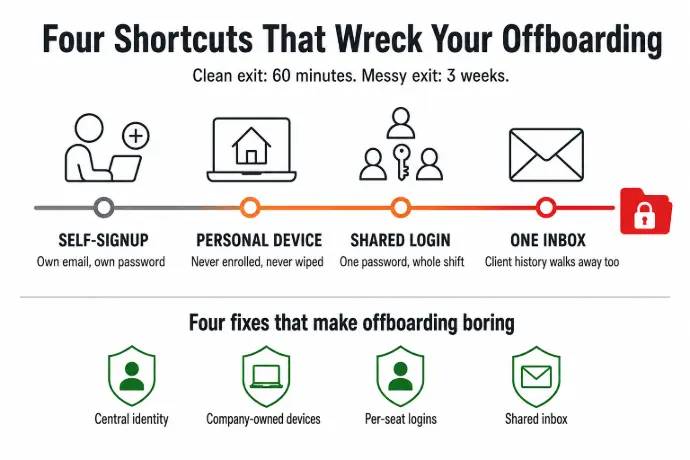
Four Onboarding Shortcuts That Wreck Your IT Offboarding Checklist
1. Letting a New Hire Set Up His Own Logins
When a new estimator signs up for a scheduling tool or a supplier portal on his own, using his own email and a password only he knows, that account is functionally his. You can't reset it without a notification going straight to him. You may not even know it exists until an invoice shows up, or until it goes dark after he leaves and a job stalls because nobody can log in. This is the single most common reason a shop can't find half its logins when someone walks out the door. The fix is provisioning every tool through one central identity, so any new account gets connected before the first login instead of after the fact.
2. Personal Devices, "Just Until We Get Him a Laptop"
A new CNC programmer starts pulling SolidWorks files onto his own laptop while the company one is on order. That temporary fix has a way of becoming permanent. He installs software, saves client files, connects to the shared drive, and by month three it's simply how he works. When he leaves, you have no way to wipe company data off a machine you never owned and never enrolled in a management system. You're trusting his goodwill, which is usually fine right up until the day it isn't. The fix is a company laptop on day one, enrolled in device management before it ever touches a shop file.
3. Shared Logins for the Tools Nobody Wants to Pay Per Seat For
Shared logins are the worst offender at exit time. When three people use the same password for a vendor portal or a shared shop tablet, you can't remove one person's access without changing it for everyone, and you usually find that out at the worst possible moment: when the person leaving is the one who set the account up and nobody else fully remembers the password. Paying per seat is the cost of doing this properly. Whatever a shared login saves on a subscription comes back as wasted hours the week someone leaves.
4. Letting a Customer Relationship Live in One Person's Inbox
This one hits hardest with OEM accounts. When the sales rep who owns a big customer relationship leaves, the history, the pricing context, and the half-finished quotes usually leave with him, because they lived in his personal inbox and nowhere else. With him gone, that context is either gone or awkward to retrieve, and from the customer's side, your shop just stopped knowing who they are. The fix is a shared inbox or a CRM where customer threads get logged, so the relationship belongs to the shop and not to whoever happened to answer the phone first.
How to Retrofit Hygiene on the Team You Already Have
You can't go back and redo onboarding for the people already on your floor. What you can do is audit what's there and close the gaps before your next departure.
The SaaS Audit
Pull three months of statements for every card that gets used for business expenses, and list every recurring charge. For each one, find out who set it up, who has the login today, whether it's tied to a personal or a company email, and whether anyone else could get in if that person left tomorrow. Shops that do this find a scheduling tool nobody remembers signing up for, a supplier portal only one person can access, and at least one seat still being paid for months after the person using it left.
The Device Register
Build a simple list: who has what, when it was issued, whether it's enrolled in a management system, and what it can reach, from the SolidWorks server to the shared drive of travelers and quality records. Ask everyone to confirm what they actually use for work, including personal devices, and most people will tell you honestly once they know nothing punitive comes of it. For any personal device that touches company systems, the minimum is managed app access for company email and files, something that can be switched off without touching the rest of the device.
Customer Communication in Shared Places
Move OEM and customer-facing communication into a shared inbox or a CRM, so continuity doesn't depend on one person staying employed. Even a shared mailbox with a clear expectation that customer threads get copied to it is a real improvement over what most shops have today, and it's the difference between a smooth handoff and a customer wondering if anyone still knows their account.
Most of this isn't a technology project. It's a spreadsheet, a few honest conversations with your team, and a handful of hours from whoever handles your IT. What separates a shop that does this well from one that doesn't is usually whether their IT provider shows up at the hire, not just the resignation. A managed IT plan built around your shop treats onboarding as part of the job, not an afterthought, the same way it treats documentation as something that outlasts any one employee.
What a Clean Roster Buys You at Renewal Time
Cyber insurance brokers and big OEM customers are both asking the same question now: who has access to what, and can you prove it. A shop that's already done the SaaS audit and the device register isn't scrambling when its next cyber insurance renewal comes up, because the answer is already written down. That's the real payoff of fixing onboarding: it isn't just a cleaner exit, it's a shop that can hand a broker or a customer a straight answer on the first try instead of the third.
IT Offboarding Checklist FAQs for Small Manufacturers
How long should IT offboarding take for a small manufacturer?
With proper onboarding hygiene and one central identity system, IT offboarding takes about 60 to 90 minutes. Skip that foundation and the same task can stretch to two or three weeks of scattered cleanup, chasing logins nobody wrote down.
What should be on a new hire onboarding checklist for a shop?
A solid new hire onboarding checklist covers four things: a company-owned device enrolled in management before day one, every account provisioned through a central identity instead of signed up independently, no shared logins for individual employees, and a shared inbox for any customer-facing role.
How do we find shadow SaaS tools nobody told us about?
Pull three months of statements from every card used for business expenses and flag every recurring charge you can't immediately explain. Most shadow SaaS shows up as a small, easy-to-miss line item long before anyone thinks to go looking for it.
Can we wipe a personal device after someone leaves the shop?
Only the company data, and only if you set that up while they were still employed. Managed app access lets you remove company email, files, and credentials from a personal phone or laptop without touching anything that belongs to the person. Without that setup in place beforehand, your options after they've left are limited.
What's the role of single sign-on in offboarding?
Single sign-on ties every tool an employee uses to one central identity, so disabling that identity in one place revokes access everywhere at once. Without it, someone has to manually track down and remove the person from each system, one login at a time, which is exactly how accounts get missed.
Not Sure What Access Your Last Three Hires Actually Have?
Starlux IT has been the IT partner for Chester and Lancaster County manufacturers since 2004, working with shops across Parkesburg, Coatesville, Downingtown, and Gap. We document every account and every login as part of setting someone up, not as an afterthought when they leave, so one resignation can never freeze your shop waiting on IT. When a cyber insurance renewal or a customer's security questionnaire lands on your desk, the paperwork is already there. Local techs handle it on-site, the same day, because production doesn't wait for a callback.
We'll spend 30 minutes with you, free, no pressure: we'll check what you have, show you the gaps, and you'll know exactly where you stand, whether you hire us or not.