
There is a computer in your shop that nobody has restarted since the last power outage. It lives under the inspection bench, or bolted to the side of the laser, or on the cart next to the mills where the programs get drip-fed. The sticker on the case is from an IT guy who left three years ago. It runs the software that talks to the machine, it has never given anyone a reason to look at it, and it runs Windows 10.
That last part is the problem, and it is a bigger problem than the pack articles about Windows 10 end of support let on, because they are written for offices. In an office, the old PC is a nuisance. In a machine shop, the old PC is the one that runs the CMM.
Microsoft stopped supporting Windows 10 on October 14, 2025. Every security hole found in the eleven months since is still open on that machine. And in about six weeks, on October 14, 2026, the price of buying yourself more time doubles. Here is the plain-English version we walk through with shops around Parkesburg and across Chester and Lancaster County, including what to do about the PCs that cannot be upgraded at all.
What "End of Support" Actually Means
When Microsoft ends support for a version of Windows, the updates stop. That includes the monthly security patches that close newly found holes. Microsoft's own end-of-support page is blunt about it: since October 14, 2025, Windows 10 gets no security fixes, no quality updates, no feature updates, and no technical support.
The PC does not stop working. Nothing switches off. That is exactly why it is easy to leave alone. What changes is that attackers and researchers keep finding flaws in Windows 10, the same way they always have, and now nobody is fixing them. Every one is another unlocked door, permanently.
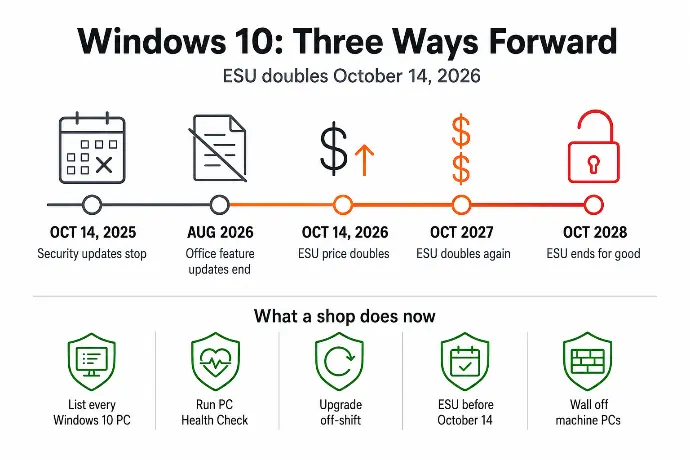
The office software is going the same way, on a slower clock. Microsoft 365 Apps (Outlook, Excel, Word) stopped getting new features on Windows 10 at the end of August 2026 and will keep getting security patches only until October 2028. Your CAD and CAM vendors publish system requirements with every release, and the release that lists Windows 11 only is coming. When it lands, the upgrade stops being a choice.
Why Windows 10 End of Support Is a Shop Floor Problem
Office PCs get replaced. Somebody's laptop gets slow, the bookkeeper complains, a new one shows up. Shop floor PCs do not work that way. They get bought with the machine, they run one program, and they live until they die. That is why the Windows 10 machines in a shop are almost never in the front office. They are the DNC PC, the CMM workstation, the control PC on the older laser or press brake, and the quoting station by the door that three people share.
Those shop floor PCs also have the most reasons to be attacked and the fewest defenses:
- They are the easy way in. Attackers go looking for computers running software that no longer gets fixed, because the holes will still be there next month. An unsupported operating system on your network is a standing invitation, and once someone is on that PC, the file server holding your SolidWorks and Mastercam files is one hop away.
- They usually have no protection of their own. The endpoint protection on the office PCs was never installed on the DNC box because "it just runs the machine." So the least-patched computer in the building is also the least-watched.
- They are on the same network as everything else. A ransomware infection that starts on the CMM PC does not stay on the CMM PC. It finds the shared drive with the prints, and the floor stops.
That is the production risk. The paperwork risk is next.
The Question on Your Renewal Form That Just Changed
Cyber insurance applications have asked for years whether you run any end-of-life or unsupported software. A "yes" used to start a conversation. Now it can raise your premium, shrink your coverage, or give the carrier a reason to fight a claim after the fact, because the underwriter can point to the unsupported operating system and call it a known, unaddressed risk.
Your bigger customers are asking the same thing. The vendor security questionnaire from a Tier-1 OEM has a line for unsupported systems, and "the laser PC runs Windows 10 but it's fine" is not an answer that gets you the next contract.
If you want to see how the carriers connect this to the rest of the application, read what cyber insurance for manufacturers really covers. The short version: every Windows 10 PC still on your network is a line item you will have to explain, twice a year, to two different people who can cost you money.
Your Three Options for Windows 10 End of Support
Most shops end up using all three, one per category of PC.
1. Upgrade to Windows 11 (free, if the hardware qualifies)
If the PC was bought in the last five or six years, the upgrade to Windows 11 is free and is usually the right move. It keeps your files and programs in place. The catch is the hardware: Windows 11 needs a supported processor, a TPM 2.0 security chip, and Secure Boot, and that rules out a lot of the older towers on the floor. Microsoft's free PC Health Check app tells you in about a minute whether a given machine passes.
One shop-specific caution: upgrade the office PCs first and the CAM workstation last, and test the post-processor, the DNC software, and the CMM program on the upgraded machine before you trust it. Most of it works fine. The one driver that does not is the one you want to find on a Saturday, not during a rush job.
2. Buy Extended Security Updates as a bridge
For a PC that cannot upgrade to Windows 11 yet, Microsoft sells Extended Security Updates (ESU) that keep the security patches coming for up to three years. The Windows 10 ESU cost for a business is $61 per device for year one, doubling to $122 for year two (which starts October 14, 2026) and $244 for year three, or about $427 per PC over the full run. Shops that manage PCs through Microsoft's cloud tools get 25 percent off, which brings year one to about $45.
Two things the pack articles skip. First, the pricing is cumulative: a PC enrolled in year two still pays for year one, so waiting does not save anything. Second, the free or $30 consumer ESU that got a lot of press is for personal devices, not business PCs, and it ends on October 13, 2026 regardless.
ESU buys patches and nothing else. No new features, no support. It is a bridge, and the toll goes up every October.
3. Replace the PC
Some machines are too old for Windows 11 and not worth $427 in ESU on top of the cost of keeping aging hardware alive. For those, a new business-class desktop, roughly $700 to $1,200, already runs Windows 11 and resets the clock on everything: the operating system, the hard drive that was going to fail anyway, and the cyber insurance question.
The Machine-Tied PC Nobody Wants to Touch
This is where a machine shop stops looking like an office. Somewhere on your floor is a PC whose only job is to talk to a machine, and whose software vendor certified it for Windows 10 and nothing newer. Sometimes the vendor is gone. Sometimes the upgrade to the Windows 11 version costs more than the PC.
The generic advice ("upgrade or replace") does not help here, so here is what we actually do:
- Ask the vendor first. More of them have a Windows 11 certified version than owners assume, and some will supply it under a support contract you are already paying for.
- If it has to stay on Windows 10, wall it off. No email, no web browsing, no shared login with the office. It goes on its own network segment, so it can reach the machine and nothing else. USB gets locked down, because a thumb drive is how programs move to that PC and how infections do too.
- Put ESU on it anyway. For $61 this year, the one PC on your network that cannot be upgraded at least gets patched.
- Back up its configuration. The parameters, the post, the calibration file. When that PC finally dies, and it will, the machine is down until somebody rebuilds it. Make that a two-hour job instead of a two-week one.
An unsupported operating system on an island is a manageable risk. The same PC on the main network with the file server is not.
How to Plan the Move Around Production
You do not have to do all of this at once. You do have to do it in order, and you have to start before October 14.
- Make the list. Every PC still on Windows 10, including the ones under benches and inside machine enclosures. This is the first line of the 30-minute monthly IT check, and most machine shops find one or two more than they expected.
- Sort the list into three piles. Office PCs, shop floor PCs that run ordinary software, and machine-tied PCs. Run PC Health Check on each one and write down the result.
- Upgrade the ones that qualify, off-shift. In batches of three or four, between shifts or on a Saturday, with someone testing the software each PC actually runs before it goes back to work.
- Enroll the ones that cannot move yet in ESU before October 14. Because the price doubles, and because it is cumulative either way.
- Schedule the replacements. Spread them across the next two or three quarters so it is a line in your IT budget for a small manufacturer instead of a surprise.
Windows 10 End of Support FAQs for Small Manufacturers
Is Windows 10 still safe to use in 2026?
It still runs, but it has not received a security update since October 14, 2025 unless the PC is enrolled in Extended Security Updates. Every flaw found since then stays open on that machine, and attackers look for exactly that. If a PC has to stay on Windows 10, enroll it in ESU and keep it off email and the web. Otherwise, plan the move to Windows 11 now.
How much does Windows 10 ESU cost for a business?
For a business, Windows 10 ESU costs $61 per device for year one, $122 for year two starting October 14, 2026, and $244 for year three, about $427 per PC over three years. Pricing is cumulative, so a PC enrolled in year two still pays for year one. Shops managing PCs through Microsoft's cloud tools get 25 percent off, which brings year one to about $45.
Can my shop PC upgrade to Windows 11 for free?
If it meets the hardware requirements, yes, and the upgrade keeps your files and programs in place. Windows 11 needs a supported processor, a TPM 2.0 security chip, and Secure Boot, which most business PCs bought in the last five or six years have. Microsoft's free PC Health Check app tells you in about a minute whether a specific machine qualifies.
What about the PC that runs my CMM or laser?
Ask the machine or software vendor first, because many now have a Windows 11 certified version and some will supply it under your support contract. If the vendor only certifies Windows 10, keep that PC but wall it off: no email, no web browsing, its own network segment, USB rules, and an ESU license. It is one machine on an island, not a door into your file server.
Should I just buy a new computer instead of paying for ESU?
If the PC cannot run Windows 11, usually yes. Three years of ESU is about $427, and that buys patches for hardware that is already six or more years old and due to fail on its own. A business-class desktop runs roughly $700 to $1,200, comes with Windows 11, and resets the clock. If the PC can upgrade, take the free upgrade and keep the money.
How long does it take to move a 20-PC shop to Windows 11?
Plan on 2 to 4 weeks, spread across off-shift windows so nobody loses production. Each eligible PC takes 1 to 2 hours to upgrade and check, and we do them in batches of three or four between shifts. The machine-tied PCs and any replacements stretch the schedule, because each one gets its CAM, DNC, or CMM software tested before it goes back on the floor.
Not Sure How Many Windows 10 PCs Are Still Out There?
Starlux IT has been the IT partner for small manufacturers around Parkesburg, Coatesville, Downingtown, and Gap since 2004. Our techs are local and on-site, which is how a machine shop actually gets off Windows 10: at the bench, between shifts, with the CMM software tested before the operator clocks in. Our managed IT plans with fixed per-PC pricing turn a PC refresh into a number you can budget instead of a scramble every October, and the finished inventory goes straight into the cyber insurance package your broker hands the carrier.
Free 30 minutes, no pressure. We'll check what you have, show you the gaps, and you'll know exactly where you stand, whether you hire us or not. We will also tell you how many Windows 10 PCs are on your network, which is a number most owners get wrong.