
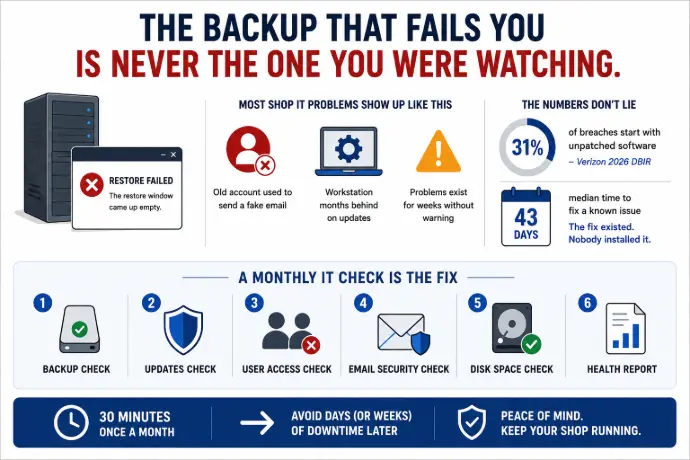
The backup that fails you is never the one you were watching. It is the one that has been quietly erroring out since March, on a server nobody had a reason to open, until the morning a programmer needs a CAM file back and the restore window comes up empty.
Most shop IT problems show up that way. Not as a sudden disaster, but as something that had been going wrong for weeks in a place nobody was looking. A monthly IT check is the fix, and it really does take thirty minutes.
The account a scammer used to send a fake banking-change email belonged to a guy who left last spring. The workstation that got encrypted was four months behind on updates. Almost none of it arrives without warning.
Verizon's 2026 Data Breach Investigations Report found that 31% of breaches started with attackers exploiting software that had not been patched, which made unpatched software the single most common way in, ahead of stolen passwords. The same report put the median time to fully fix a known problem at 43 days. Read that again: the fix existed, it was published, and nobody installed it for six weeks.
Here is the plain-English version we walk through with shops around Parkesburg and across Chester and Lancaster County. Six items, no jargon, no special access required.
Why a Monthly IT Check Beats Waiting for the Breakdown
A machine shop does not lose money the way an office does. When an accounting firm's server goes down, work stops for a few people. When your file server goes down, the shop floor stops. Nobody pulls prints, nobody loads a program, and the jobs promised for Friday sit half-finished in the vise.
That is why the small stuff matters more here than the generic advice admits:
- A backup nobody has tested is a backup that has never been proven to bring back a SolidWorks assembly, a Mastercam program, or the job-tracking database your quoting runs on.
- An account still switched on for someone who left in April is a working key to your email, handed to whoever guesses the password first.
- A workstation running months-old software is the machine a customer's stolen invoice gets sent from, in your name, on your letterhead.
There are two outside forces pushing on this too. Your cyber insurance carrier now asks whether you have multi-factor authentication and tested backups, and they ask in writing at renewal. Your bigger customers send vendor security questionnaires that assume somebody at your company is checking these things monthly. Both are easier to answer honestly when someone actually is.
The 30-Minute Monthly IT Check, Step by Step
Give each item about five minutes. Write down what you find. Do not stop to fix anything yet, because that is how thirty minutes turns into a lost afternoon and a habit you abandon by month three.
1. Updates
Open a couple of the computers people actually use, including the one running your quoting, and see whether Windows updates are installing or sitting at "restart required" week after week. Do the same for the browser and for phones with company email on them. If your people keep clicking "remind me later" because a restart means losing what is on screen, that is a scheduling problem worth solving, not a discipline problem.
Pay attention to the machines nobody reboots: the one wired to a CMM, the old PC running a machine controller, the shipping terminal. Those are the ones that fall furthest behind.
2. Backups
Open the backup tool and look at the last several runs. You want a column of successes, not a wall of red. Then answer a harder question: when did anyone last pull a file back out of it? If the answer is never, you do not have a backup, you have a hopeful assumption.
Once a quarter, restore something real. A print, a program, a folder from a finished job. That five-minute test is the difference between a backup and recovery plan built for a shop and a green checkmark that means nothing.
3. Who still has an account
Pull up the user list in Microsoft 365 or Google Workspace and read every name out loud. Every one should be a person who still works here. You are looking for three things: people who left, contractors who finished months ago, and shared logins like "office" or "shipping" that four people use and nobody owns.
Shared logins are worth singling out. When everyone uses the same account, you cannot tell who did what, and you cannot switch it off when one of those four people leaves.
4. Multi-factor authentication
Check that multi-factor authentication is switched on, and that it is on for everyone rather than just the two people who set it up first. Start with whoever approves payments and whoever has admin rights, because those are the accounts worth stealing.
Microsoft's research shows multi-factor authentication blocks more than 99.2% of account compromise attacks. There is no cheaper control available to a 20-person shop, and there is no control your insurance carrier asks about more often.
5. Devices on the network
Look at what is connected. If there is a laptop, tablet, or phone you do not recognize, find out whose it is before you assume it is fine. While you are in there, confirm that laptops leaving the building are encrypted and that any phone pulling company email has a passcode or a fingerprint lock.
Shops accumulate devices in a way offices do not. A vendor's laptop plugged in for a machine install, a tablet on the shop floor for drawings, a personal phone on the shop Wi-Fi. Most of it is harmless. You just want to know it is there.
6. Licenses and subscriptions
Open the billing page and read what you are paying for. Almost every shop finds at least one of these: a seat still billing for someone who left, two tools doing the same job, or software somebody signed up for without telling anyone. It is a small monthly refund and a useful look at what is actually running in your business.
Make It a Routine Somebody Owns
Put it on the calendar on a fixed day, like the first Monday of the month, and give it to the same person every time. That is you, your office manager, or whoever handles the admin side. Rotating it guarantees it stops happening.
Keep a running note of what you checked and what you found. After three or four months the pattern is the valuable part. If the same workstation fails updates every single month, it does not need clearing again, it needs fixing properly or replacing.
What You Fix and What You Send Out
Most of what turns up is small. A laptop that needs a real restart, a license to cancel, an account to switch off. Handle those yourself the same week.
Send the rest to your IT provider, and be specific about which rest:
- Backups that keep failing, or that have never been restored from
- Multi-factor authentication that will not turn on for somebody
- A device on the network nobody can identify
- Updates that fail on the same machine every month
- Anything touching the server your job files or job tracking live on
Those usually mean there is a bigger problem underneath, and the monthly IT check is not the tool for diagnosing it.
What This Check Does Not Cover
This is not monitoring, and it should not be sold to you as monitoring. A provider watching your systems has tools running all day, catching a failed drive at 11pm on second shift or a strange login from another country on a Sunday. Thirty minutes once a month will never see any of that. It is also worth understanding the difference between antivirus and EDR before you assume the software on your machines is doing that job for you.
What the check does cover is the half no monitoring tool can know. Software cannot tell that Dave retired in June, that nobody approved the subscription on line four of your bill, or that the tablet on the network belongs to a vendor who finished the install in April. You know those things. That is why this list stays with you even when you have a provider handling the rest.
Where This Pays Off Twice: Renewals and Customer Questionnaires
The same six items are most of what your insurance carrier and your biggest customers are asking about. When renewal paperwork asks whether multi-factor authentication is enforced, whether backups are tested, and whether accounts are reviewed, a shop that has been running a monthly IT check answers from a notebook instead of guessing. Guessing on that form is how shops end up with a denied claim or a premium nobody budgeted for.
It is worth knowing what your cyber insurance carrier is actually asking for before the renewal lands, not the week it is due. We put the answers together in a package you can hand straight to your broker, which turns a stressful week into an email.
Monthly IT Check FAQs for Small Manufacturers
How often should a machine shop check its IT?
Once a month for the full list, which takes about 30 minutes. Backups deserve a shorter look every week if losing a day of production data would hurt, since backups are the item most likely to fail quietly. Anything urgent, like a machine that will not finish an update, goes to your IT provider the same day.
How long does a monthly IT check actually take?
Thirty minutes, as long as you do not stop to fix things along the way. Budget roughly five minutes each for updates, backups, account lists, multi-factor authentication, devices, and licenses. Write down what you find and handle the repairs afterward. Owners who fix as they go usually run past an hour and quit doing it by month three.
Who should do it in a small shop?
The owner, the office manager, or whoever runs the admin side. Most of the list needs no technical skill. It needs someone who knows who still works here, which subscriptions were approved, and whose laptop is whose. That knowledge is exactly what an outside IT provider does not have.
If I only have ten minutes, what matters most?
Backups and updates. Until you have restored a file from your backup at least once, you do not know whether you can get your job files back at all. And unpatched software is now the most common way attackers get in, ahead of stolen passwords. Those two items cover the most ground in the least time.
Isn't this my IT provider's job?
They handle the monitoring, the patching, and the repairs. The monthly IT check covers the part that depends on knowing your business: who left last month, which subscription nobody approved, whose tablet is on the shop floor Wi-Fi. A good provider hands you a monthly summary covering most of the technical half.
Does any of this change if we run everything in the cloud?
No. Cloud tools still need patched devices, tested backups, multi-factor authentication switched on, and an account list that matches your actual payroll. Hosted job tracking does not necessarily keep history as long as you assume either. Read what your vendor's retention policy actually promises before you count on it.
When Was the Last Time Anyone Actually Looked?
Starlux IT has been the IT partner for Pennsylvania manufacturers since 2004. We work with job shops, machine shops, and fabricators in Parkesburg, Coatesville, Downingtown, Gap, and across Chester and Lancaster County. We know what a file server full of CAD and CAM work is worth to a shop floor at 6am, we monitor around the clock so second and third shift are not on their own, and we put together the cyber insurance documentation you can hand to your broker without a phone call. That is what managed IT built around manufacturing actually means.
If you have read this far and quietly realized nobody has looked at your backups in a while, start there. Give us thirty minutes and we will check what you have, show you the gaps, and you will know exactly where you stand, whether you hire us or not. No pressure and no obligation.