
Your bookkeeper is holding her phone up to her monitor. On the screen is a PDF invoice from a supplier you actually use, for an amount that looks right, with a black-and-white square in the corner and three words under it: scan to pay. She is not being careless. She is doing what the invoice told her to do, the way she has done it at the grocery store and the restaurant and the parking garage all year.
The moment her phone reads the square, the attack has already won the part that matters. QR code scams work because the link is a picture, and every dollar you spend on email security is spent on reading text. The filter that catches the fake links in the office manager's inbox saw a harmless image. The phone that opened it is on cell data, outside every protection you pay for. The fake payment page loads on a screen too small to show the address.
Microsoft counted 8.3 billion phishing emails in the first three months of 2026. The QR kind grew faster than anything else in the report. Here is the plain-English version we walk through with shops around Parkesburg and across Chester and Lancaster County: what quishing is, the versions a machine shop actually sees, and what to do when somebody has already scanned one.
What a QR Code Scam Is, and Why It's Called Quishing
A QR code is a web link written as a picture. Point a phone camera at it, and the phone reads the pattern, turns it back into a link, and opens it. That is all it is, and that is the whole problem, because a link in a picture is a link your email filter cannot read.
A QR code scam, which the security trade calls quishing (QR plus phishing), is a phishing attack that hides its link inside that square. Everything else is the same play you already know: a message that looks like it came from a supplier, a customer, Microsoft, or a freight company, a reason to act now, and a page at the end that takes a password, a payment, or an install. The square is the delivery method. The damage is the same as any other scam email, which is why the habits that stop it are mostly the ones you already teach, with two additions for the phone.
Why QR Code Scams Get Past Your Shop's Security
There are three reasons, and they stack.
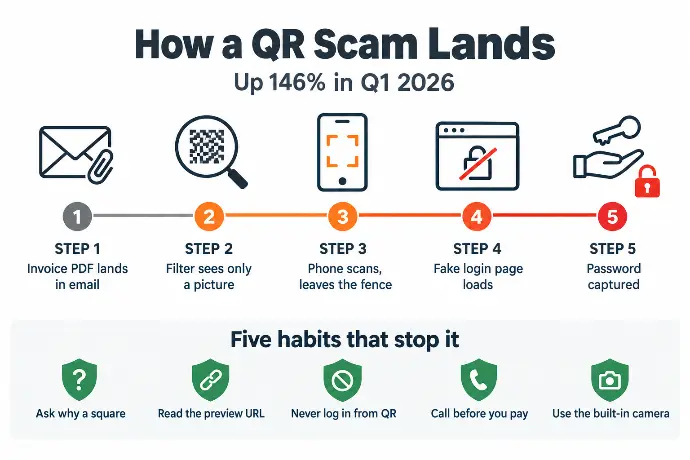
The link is an image. Email filters and link scanners read text. They check the address behind a link, compare it to lists of known bad sites, and strip or flag what fails. A QR code is a picture, and most filters do not decode pictures. That is the gap quishing lives in. Microsoft's Q1 2026 threat report counted 18.7 million QR code phishing emails in the quarter, up 146 percent from the quarter before, and about 70 percent of them arrived as PDF attachments. A PDF with a square on it is exactly what a real invoice looks like. Volume has eased since a large phishing operation was taken down in March, but the technique is still there, because the gap it exploits is still there.
The phone is outside the fence. The PCs in a machine shop have endpoint protection, a web filter, and a browser that warns about bad sites. The office manager's personal phone, on cell data, has none of that. When she scans a code from her monitor, she has walked the attack out the front door of your security and onto a device you do not manage.
Phones are trusted and screens are small. People scan QR codes a dozen times a week without a second thought. On a phone, the address bar is tiny, the page fills the screen, and a fake Microsoft login looks like the real one down to the pixel. The thing that would have tipped her off on a 24-inch monitor is invisible on a six-inch phone.
The QR Code Scams a Machine Shop Actually Sees
The FTC's consumer alert describes the versions aimed at the public: stickers over parking meters, fake package notices, codes on payment terminals. Those hit your people too. But the ones aimed at a shop look like the paperwork you handle every day.
- The scan to pay invoice. A PDF from a supplier name you recognize, an amount that is plausible, and a square that "makes paying faster." The page it opens takes card or bank details, or asks you to log in to a "vendor portal" that is not one.
- The MFA re-enrollment notice. "Your Microsoft 365 sign-in method expires today. Scan to re-register your authenticator." This is the most common QR code phishing aimed at businesses, because the password it captures opens the mailbox, and the mailbox is where the invoice fraud starts.
- The revised print. "Rev C attached. Scan to view the updated drawing." Sent under a customer's name, sometimes a real one pulled from an earlier compromise. Nobody in quoting wants to be the one who cut to the old rev.
- The freight reschedule. A delivery notice for a shipment you may well be expecting, with a code to "confirm the delivery window." It leads to a login page.
- The one wearing your name. Attackers who spoof your domain send scan to pay invoices to your customers. Your customer loses the money, and you lose the customer. If you have not already, stop email spoofing in your shop's name; it is a two-hour fix with a long payoff.
Notice what these have in common. None of them is a stranger. All of them are a supplier, a customer, a carrier, or Microsoft, asking for something a shop does every day.
How to Protect Your Shop From QR Code Scams
The habits below are the ones we train in every machine shop we work with, and they work because they do not depend on the filter.
- Ask why it is a square. A real supplier who wants to be paid sends a link to a portal or the remit-to details already on file. A square in an email or a PDF is unusual on its own, and unusual is the tell.
- Read the preview before you open it. Phones show the address the code points to before the page loads. If it is a jumble, a shortened link, or a domain you do not recognize, stop. If your phone does not show a preview, do not use it to scan anything work-related.
- Never log in from a QR code. If a code lands on a Microsoft, Google, bank, or vendor login page, close it. Open the app or type the address yourself. This one rule beats most of what is in the Microsoft report.
- Call before you pay. Any change to how or where a supplier gets paid goes through a phone call to a number you already have, not one on the invoice. This is the same rule that stops wire fraud, and a scan to pay square is just wire fraud with a new front door.
- Check physical codes for stickers. In the real world, look for a code pasted over another one. If there is any doubt, use the payment machine's own screen or go to the counter.
- Use the built-in camera, not a scanner app. The camera app on a modern phone scans QR codes and shows a preview. Downloaded "scanner" apps are one more thing that can be fake.
- Put the phones inside the fence. The phones that read company email should have the same web filtering your PCs do, and the accounts they sign into should use passkeys or another phishing-resistant sign-in so a captured password is worth nothing. That is a one-time setup, and it is the part a training poster cannot do.
Train it short and often. Two minutes at the Monday toolbox talk with a real example beats an annual hour-long video nobody remembers. The bookkeeper who saw "why is it a square" on a slide last week is the one who puts the phone down this week.
If Someone Already Scanned One
Scanning a fake QR code by itself does nothing. What happens next depends on what they did on the page.
- They only looked and closed it. Almost certainly fine. Have them tell you anyway, so the email gets pulled from everyone else's inbox.
- They typed a password. Change it now, from a different device. Sign the account out everywhere, and check the MFA settings for a method that was added in the last hour. Attackers add their own authenticator so the reset does not lock them out.
- They paid or entered bank details. Call the bank immediately and ask them to recall or freeze the payment. Report it to the FBI's IC3 within 72 hours, because that is the window where money actually comes back. Then follow the rest of the first-hour plan.
- They installed something. That phone stays off company email and Wi-Fi until someone has looked at it. Do not assume a personal phone is anyone else's problem; it was on your invoice a minute ago.
- In every case, tell IT within the hour, and forward the original email as an attachment, not a forward, so the headers survive.
The Training Question on Your Next Application
Cyber insurance applications ask whether your employees receive security awareness training, and increasingly how often. "Once, at hire" is becoming an answer that costs small manufacturers money at renewal. QR code scams are the reason underwriters care: this is a class of attack the filter is not going to catch, which means the person holding the phone is the control, and the carrier wants to know that person has been trained this quarter, not two years ago.
Read what cyber insurance for manufacturers really asks for to see where training sits alongside MFA and backups on the form. Our cyber-insurance package includes the short, regular training and the record of who completed it, in the format your broker hands the underwriter.
QR Code Scam FAQs for Small Manufacturers
What is a QR code scam?
A QR code scam, also called quishing, is a phishing attack where the malicious link is hidden inside a QR code instead of written out. The code arrives in an email, a PDF invoice, a text, or a sticker. Scanning it sends your phone to a fake login page, a fake payment page, or a malware download, and the phone's small screen hides where you actually went.
Can scanning a QR code hack my phone?
Scanning by itself does nothing. A QR code is just a link, and the damage happens on the page it opens: entering a password on a fake login, approving a payment, or agreeing to install something. If you scanned a code and closed the page without typing or tapping anything, you are almost certainly fine. Read the preview before you open it, and never log in from one.
How can I tell if a QR code is fake?
Ask why it is a square instead of a link; a real supplier rarely needs one in an email. Read the preview address your phone shows before opening it, and watch for misspelled or unfamiliar domains. On a sign or terminal, check for a sticker placed over the original. If a code asks you to log in or pay, close it and go to the site the normal way.
Are QR codes on invoices safe to scan?
Treat them as unsafe by default. Most QR phishing arrives as a PDF attachment, and a fake invoice with a scan-to-pay square is the most common version a shop's bookkeeper will see. Pay the way you always have, through the supplier's portal or by the method already on file, and confirm any new payment method by calling the supplier at a number you already know.
What should I do if I scanned a fake QR code?
If you entered a password, change it from a different device, sign out of all sessions, and check that no new MFA method was added. If you paid, call your bank immediately and report it to the FBI's IC3 within 72 hours. If you installed anything, keep the phone off company email until IT has checked it. Then tell IT within the hour, with the original email attached.
How common are QR code scams?
Microsoft counted 18.7 million QR phishing emails in the first quarter of 2026, up 146 percent from the quarter before, with about 70 percent of them delivered as PDF attachments. Volume dipped from that peak after a large phishing operation was disrupted in March, but the technique has not gone anywhere, because it still gets past filters that read text and not pictures.
Would Your Office Manager Scan It?
Starlux IT has been the IT partner for small manufacturers around Parkesburg, Coatesville, Downingtown, and Gap since 2004. Our managed IT with phishing training built in keeps that training short and regular, with real examples like the ones above, and puts the phones that read your email behind the same filtering as your PCs. Our techs are local and on-site, so when a fake QR code gets scanned at 4:40 on a Friday, the person who fixes it is a phone call and a short drive away, not a ticket queue. And the whole thing lands in the cyber-insurance package your broker needs at renewal.
Free 30 minutes, no pressure. We'll check what you have, show you the gaps, and you'll know exactly where you stand, whether you hire us or not. We will also send your office a scan to pay invoice of our own, so you find out who would have scanned it before someone else does.