
Your office manager sets a printed email on your desk and waits. It is on your letterhead, your logo is in the corner, and the signature block is close enough that you have to look twice. It says your bank details have changed and asks that the next payment go to a new account.
She did not print it off your sent folder. Your best customer's accounts payable clerk forwarded it, asking whether it was really from you.
It was not. Nobody guessed a password or broke into your server. Somebody typed your domain into the From field and hit send. That is email spoofing, and the reason it works has nothing to do with how good your firewall is.
The money at risk is not abstract. Business email compromise, the category these fake payment emails fall under, accounted for more than $3 billion in reported losses in 2025 according to the FBI's 2025 Internet Crime Report, second only to investment fraud. Most of it moves by wire or ACH, which means it is usually gone by the time anyone notices.
Here is the plain-English version we walk through with shops around Parkesburg and across Chester and Lancaster County: what is actually happening, the three records that stop it, the one setting most businesses get wrong, and how to find out where your own domain stands.
Why Email Spoofing Works Against a Job Shop
Email was built in a more trusting era. On its own, the system that delivers mail never checks that a sender is who they claim to be. The From line is about as trustworthy as a return address handwritten on an envelope. Anyone can write anything there, and the mail still gets delivered.
What makes this dangerous for a shop is that the scam is rarely aimed at you. It is aimed at the people who pay you and the people you pay.
Think about what "email from your shop" actually is:
- Quotes going out to purchasing managers who have never met you in person
- Order confirmations and ship notices out of JobBOSS, E2, or QuickBooks
- Invoices and payment terms from the office manager
- POs to your steel supplier and your tooling vendor
Every one of those is a message a scammer can imitate. A fake remittance update to your customer's AP department. A fake supplier invoice to your bookkeeper. Investigators call this business email compromise. On the floor it just looks like a customer who insists they already paid. One convincing message and a payment for parts you already shipped lands in a criminal's account, while your customer believes in good faith that they paid you. Then comes the collections call you have to make on an invoice that was, from their side, already settled.
That is the part owners underestimate. Invoice fraud does not just cost the payment. It costs the account, because you are now the vendor whose name showed up on a fraud.
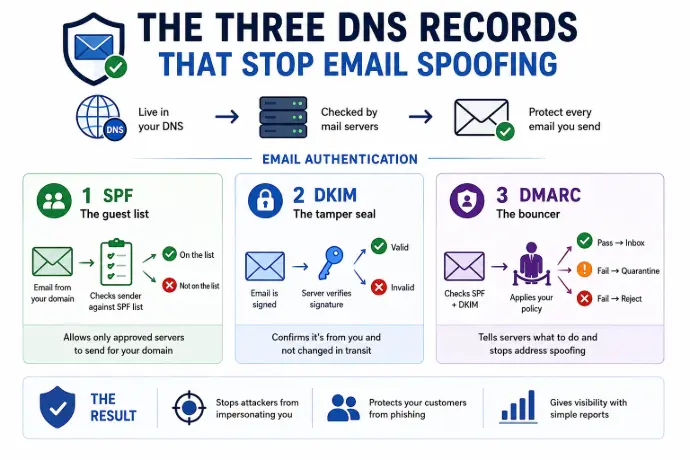
The Three DNS Records That Stop Email Spoofing
Three records work together to prove a message really came from your domain. They live in your DNS, the same place your website address lives. You publish them once, and receiving mail servers check them automatically on every message you send. Together they are called email authentication.
SPF: the guest list
SPF (Sender Policy Framework) is a published list of the mail servers allowed to send email for your domain. When a message arrives claiming to be from you, the receiving server checks whether it came from a server on that list. Not on the list, and it gets flagged.
DKIM: the tamper seal
DKIM (DomainKeys Identified Mail) adds a cryptographic signature to every message you send. The receiving server verifies it and confirms two things: the message genuinely came from your domain, and nobody altered it in transit. Nobody swapped the bank account number on the invoice between your outbox and their inbox.
DMARC: the bouncer
DMARC (Domain-based Message Authentication, Reporting and Conformance) ties the first two together. It tells receiving servers what to do with a message that fails the check, and it confirms that the address your customer sees matches the domain that actually passed. That last part is what stops someone forging your exact address. It also sends you reports listing everyone sending email as your domain, including the senders who should not be.
The DMARC Policy Setting Most Shops Get Wrong
Here is where most businesses stumble. Not by skipping DMARC, but by running it in a mode that protects nothing.
A DMARC policy has three settings:
- p=none. Monitor only. Fakes still get delivered. You just get a report about it afterward.
- p=quarantine. Failing messages go to the junk folder.
- p=reject. Failing messages are turned away before they ever arrive.
A lot of businesses publish a DMARC policy at p=none, watch the reports roll in for a week, and never move past it. At p=none your domain can be spoofed all day long. Real protection starts at quarantine and finishes at reject.
If somebody set this up for you years ago and has not touched it since, that one setting is worth checking today. It is a five minute look. We find shops sitting at p=none more often than we find shops with nothing at all, and the second group at least knows they are unprotected.
What Email Authentication Does Not Stop
These records stop someone from forging your exact domain. Two tricks slip past them, and both are worth two minutes with whoever pays your bills.
Lookalike domains. A scammer registers something that resembles yours, like yourshopname-invoices.com, or .co instead of .com, and sends from that. Your records protect your real domain, not the copycat somebody else owns.
Display-name spoofing. The name shown in the inbox reads "Precision Machine Accounting" while the address behind it is a random free webmail account. DMARC checks the domain, not the display name.
Plenty of successful invoice fraud uses one of those two rather than a forged domain, which is why the records are the floor and not the ceiling.
The defense for both is a habit, not a setting. Check the full email address, not just the name. And verify any request to change payment details by calling a number you already have on file, never a number printed in the email itself. Make it an office rule the way lockout/tagout is a floor rule: no exceptions, no matter how busy the week is. The same rule applies in reverse when a customer calls to verify a change on your side, which is how you find out someone is using your name before the money moves.
Worth pairing with this: if a spoofed email ever turns into a real compromise, it is usually because someone reused a password. Locking down the email accounts themselves is the other half of this job.
Your Quotes Are Also Landing in Junk
There is a second cost to an unauthenticated domain, and it shows up in your sales numbers rather than your fraud losses.
The big mailbox providers have stopped being patient. Since February 2024, Google and Yahoo have required high volume senders to authenticate with SPF, DKIM, and DMARC, and Microsoft applied similar requirements to Outlook and Hotmail accounts starting in May 2025. You are almost certainly well under the volume thresholds in Google's published sender guidelines, but the filtering does not stop at the threshold. An authenticated domain is simply far more likely to reach an inbox than a spam folder.
For a shop, "the spam folder" has a price tag: the quote a purchasing manager never saw, the order confirmation that never arrived, the invoice that ages thirty days because it sat in junk. If customers keep telling you they did not get your email, this is one of the first things worth checking.
Rolling It Out Without Blocking Your Own Invoices
You can get a rough read in five minutes. Doing it properly takes a careful sequence, because these records live in your DNS and a mistake sends your own quotes and invoices to spam. The rollout happens in stages, and nobody should skip to the end.
1. See where you stand
Free SPF and DMARC checkers let you type in your domain and see which records exist. That tells you the records are present. It does not tell you whether they are configured correctly, or whether your DMARC policy is sitting uselessly at p=none.
2. Account for everything that sends mail as you
SPF and DKIM have to cover every legitimate source of your email: your mail service, your ERP or accounting system if it sends invoices and order confirmations directly, your quoting tools, a marketing platform if you use one, the scan-to-email on the copier. Miss one and its mail starts failing the very checks meant to protect you. This is also the moment to write the list down, so the next person to touch your DNS is not guessing.
3. Turn on monitoring and actually read the reports
Start at p=none and watch the reports for two to four weeks. This is where you find the sending system nobody remembered, and where you confirm your real mail passes before anything gets blocked.
4. Step up to quarantine, then reject
Once the reports come back clean, move to p=quarantine, then p=reject. That is the point where your domain is protected rather than observed.
This is a job for whoever manages your IT, because it touches DNS, your mail service, and every system that sends on your behalf. Done right it is invisible: your mail keeps flowing and the fakes stop.
One Less Blank on the Insurance Renewal
Email authentication has a way of showing up in two documents shop owners have learned to dread: the cyber insurance renewal application and the vendor security questionnaire from a big customer. Both increasingly ask how you prevent email impersonation and payment fraud, and "SPF, DKIM, and DMARC at enforcement" is the answer they are looking for.
Getting the records right before the renewal or the questionnaire lands means one less blank you cannot fill in. It is part of the compliance package we build for manufacturers: set up the controls, document them, and hand the paperwork straight to your broker or your customer's security team. If renewal season is what brought you here, it is worth reading up on what carriers are asking for on cyber insurance renewals before you fill in the application.
Email Spoofing FAQs for Small Manufacturers
What is email spoofing?
Email spoofing is when someone sends a message with your domain in the From line without ever touching your systems. No password is stolen and no server is broken into. The sending system simply never verifies the From address, so unless your domain publishes records telling receiving servers how to spot a fake, the message gets delivered.
What are SPF, DKIM, and DMARC in plain English?
SPF is the list of mail servers allowed to send email for your domain. DKIM is a tamper seal proving a message came from you and was not altered on the way. DMARC ties the two together, tells receiving servers what to do with a message that fails, and sends you reports on who is sending mail as your domain.
How long does it take to set up email authentication for a small shop?
Plan on 4 to 8 weeks start to finish for a 15 to 40 person shop. The DNS records themselves take an afternoon. The time goes into the monitoring stage, where you read DMARC reports for 2 to 4 weeks to find every system sending mail as you before you turn on enforcement and risk blocking your own invoices.
Will turning on DMARC block our own quotes and invoices?
Not if it is rolled out in stages. Legitimate mail only gets blocked when a sending system was missed during setup, which is exactly what the monitoring stage exists to catch. Start at p=none, read the reports until every real sender passes, then step up to quarantine and reject. Skipping straight to enforcement is what sends real quotes to junk.
Does DMARC stop every fake email?
No. It stops someone forging your exact domain. It does not stop a lookalike domain the scammer registered, and it does not stop a free webmail account using your company name as its display name. Those two need a habit rather than a setting: check the full address, and verify payment changes by phone using a number you already have.
Do we need this if we only send a few emails a day?
Yes, for two reasons. Volume has nothing to do with whether someone can impersonate you to your customers and suppliers. And the large mailbox providers now weigh authentication when deciding whether your quote reaches an inbox or a junk folder, so an unprotected domain quietly costs you delivered mail either way.
Not Sure Whether Your Domain Can Be Faked?
Starlux IT supports manufacturers in Parkesburg, Coatesville, Downingtown, Gap, and across Chester and Lancaster County. We know how shop email actually works, with quotes, confirmations, and invoices coming out of systems like JobBOSS, E2, and QuickBooks, and we set up email authentication so the fakes get blocked while your real mail keeps landing in inboxes. Every record gets documented, so this does not become one more thing that lives in one person's head.
It is the same work that satisfies cyber insurance applications and customer security questionnaires, and it fits alongside the rest of our managed IT plans built for manufacturers. Give us 30 minutes, free, no pressure. We will check your domain, show you exactly where the gaps are, and you will know where you stand, whether you hire us or not.